Basic Arcweave tutorial | Part 6: Mentions
Mention components and boards to easily access them and keep them up to date with any changes of name.
ℹ️ This tutorial does not refer to mentioning users in comments.
Video tutorial
Watch this tutorial as a video:
⚠️ This video does not reflect the latest updates to Arcweave's UI.
✅ You can play the finished version of the Tutorial Project here and explore its diagrams and structure here.
Why mentions
As a project grows, it can become increasingly difficult to keep track of all its parts. You may have boards for outlines, scenes, and dialogue trees, as well as components for characters, locations, items, and scenery. Navigating to a specific element or updating something (like a character's name) across the entire project can quickly turn into a manual and error-prone process.
Arcweave's mentions feature solves this by creating a live, organic connection between the parts of your project. When you mention a component or a board in your text, that reference stays in sync automatically: rename the component or board and every mention updates with it.
Search
Before diving into mentions, it's worth remembering that Arcweave has a built-in search tool.
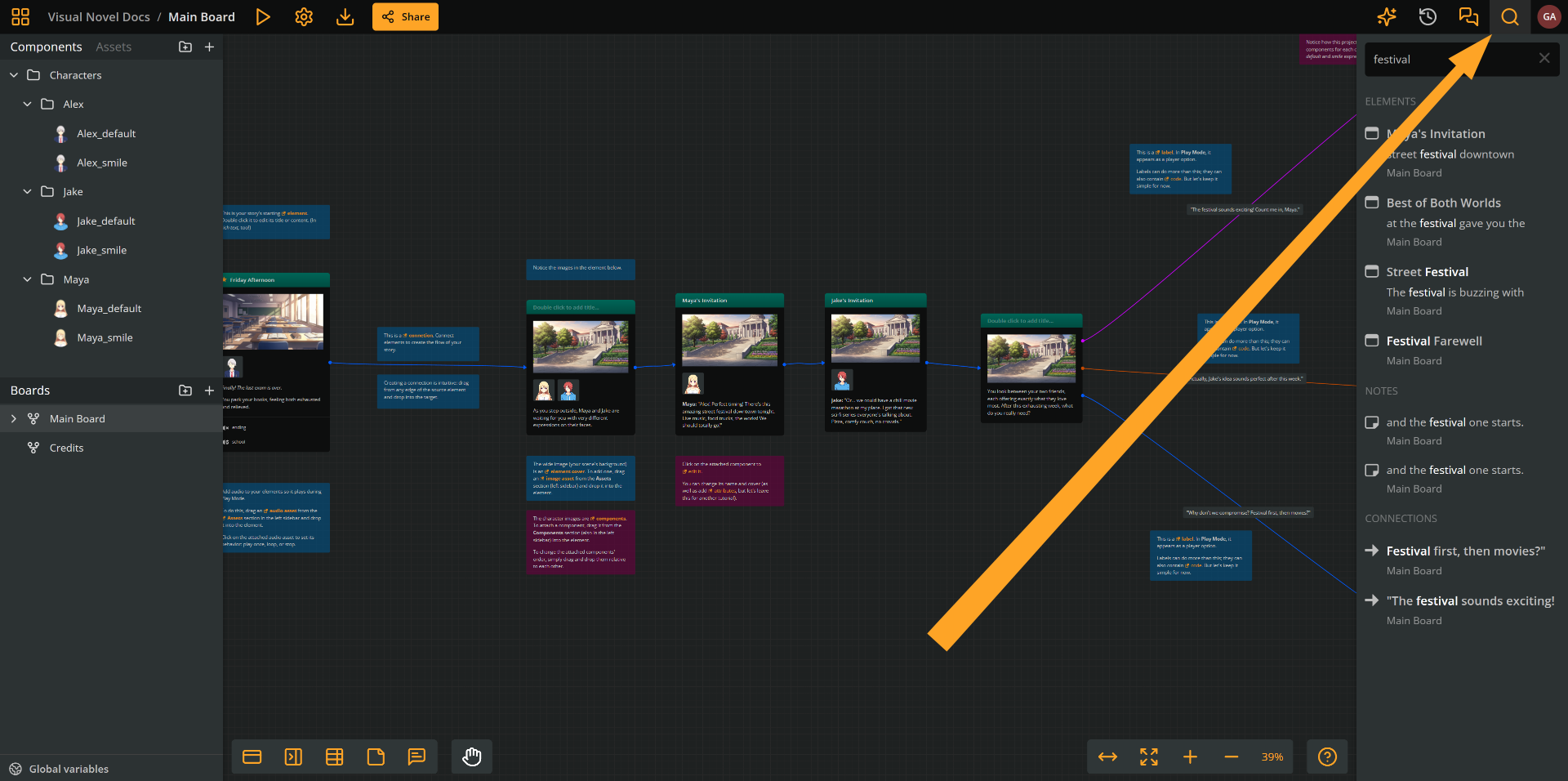
To search your project for any text occurrence:
- Click Search project (the magnifying glass icon at the top right of your screen).
- Type any word or phrase in the search field. Arcweave will list every item that contains it.
- Click a search result to locate the respective item.
Search is useful for finding anything, including components by name, but it doesn't allow renaming.
For that, mentions are the appropriate tool.
Mention components
What they are
Mentioning a component links its name in your text with the component itself. In the rich text, names of mentioned components appear in orange text.

What they do
Mentions:
- Act as clickable links to the component.
- Automatically reflect any name changes.
Where they appear
You can insert mentions by typing in any field of rich text:
- Title or content of elements
- Notes
- Rich text attributes
- Connection labels
ℹ️ Mentions are not visually styled in Play Mode; they appear as regular text.
Add mentions
To insert a component mention:
- Open a field of rich text (element title or content, label, or note).
- Place your cursor where you want the mention to appear.
- Type the
@character. A dropdown list of your project's components appears. - Start typing the component's name and select it from the list.

The mention is now embedded in your text. It renders as a highlighted, clickable link. Clicking it opens the referenced component directly.
Rename mentioned component
When you rename a component, every mention of it across the project updates its displayed text to match the new name. No need to manually find and replace.
To test this:
- Open the component you have mentioned.
- Edit the component's name.
- Return to any rich text field that mentions it. The mention text reflects the new name immediately.
⚠️ Automatic updates only apply to text that uses mentions. Any occurrence where you typed the name manually will not update. Make sure to use mentions wherever you want changes to propagate.
Mention boards
Besides components, you can also mention boards in any rich text field of your project. This is useful for cross-referencing different areas of your project.
The process is identical to mentioning a component:
- Place your cursor in a rich text field.
- Type
@and begin typing the board's name. - Select the board from the dropdown.
Just like component mentions, board mentions stay in sync: if you rename the board, the mention text updates everywhere it appears.
What's next
Using mentions is especially valuable when collaborating with a team. If one person renames a character or restructures a board, every reference in the project updates automatically. Nothing gets left behind and the whole project stays in sync.
The next tutorial will introduce Arcweave notes and suggest how they can help with your project collaboration and management.